Quick answer: Building an Instagram carousel takes about 30 minutes across 5 steps: choose one topic ("Storm Damage? 5-Minute Assessment Guide," "Botox Myths Debunked"), plan a slide-by-slide outline (hook, repeat/rephrase, 3-5 value slides, a CTA slide), keep visuals consistent across every slide (one background color, two fonts max, the same logo placement), write short scannable copy (one to two sentences per slide, 40pt+ headlines), then publish with a caption and five relevant hashtags. Carousels outperform single images because they combine curiosity with progressive disclosure: users spend 40% more time on them and save them at three times the rate.
Key Takeaways
- Carousels get 40% more time-spent and roughly three times more saves than single-image posts, because the swipe mechanic rewards curiosity and storytelling.
- The whole process takes about 30 minutes: 2 minutes to choose a topic, 5 to plan slides, 10 for visual consistency, 5 for copy, and 2 to publish or schedule.
- A 6-slide structure works for most small businesses: hook, repeat/rephrase, three value slides, one clear CTA slide.
- Design for 1080×1350px or 1080×1080px, keep one background color and a maximum of two fonts, and don't cram text — white space matters as much as the copy.
- Small businesses that publish carousels consistently report 25-40% higher engagement within 30 days compared to single-image posts alone.
Skip the blank canvas — pick your industry and Maxolot's AI Post Maker writes and designs the carousel for you, no prompt required. 10 free posts · No credit card · No watermark.
A 5-Step Process Any Small Business Owner Can Follow
Instagram carousels are the platform's highest-engagement format, but most small business owners assume they need design skills or expensive software to make one. This guide breaks carousel creation into five steps, no design experience required.
5 Steps to Create Your First Instagram Carousel (The Proven Process)
This is the exact sequence to go from a blank page to a published carousel in about 30 minutes, no design background needed.
Step 1: Choose Your Carousel Type (2 minutes)
Pick one carousel topic that matches your business:
- Product showcase — "Best Holiday Gift Selection"
- Transformation — before/after results
- Educational — a how-to, 5-step guide
- Customer win — a testimonial in slide form
- Industry tips — quick, practical advice
- Narrative — a day in the life of your business
Step 2: Plan Your Slides (5 minutes)
Write a one-line hook for each slide before you touch any design tool:
- Slide 1: Hook — why should someone swipe?
- Slide 2: Repeat the hook from a different angle, or summarize what's coming
- Slides 3-5: Value — the education or insight you promised
- Slide 6: A clear call to action
Step 3: Create Visual Consistency (10 minutes)
Use the same background color, font family, and brand elements on every slide:
- One background color across all slides
- A maximum of two fonts: one bold, distinctive font for headlines, one clean, readable font for body text
- Consistent logo placement, slide after slide
- A color palette limited to three or four colors
- Generous white space — don't cram text onto a slide
Step 4: Add Clear, Scannable Copy (5 minutes)
Keep it concise: one to two sentences per slide, maximum.
- Bold the most important words on each slide
- Make sure text contrasts cleanly against the background
- Font size rule of thumb: headlines at 40pt or larger, body text at 18pt minimum
Step 5: Publish or Schedule (2 minutes)
Write a compelling caption, add five relevant hashtags, and either publish immediately or schedule for your audience's peak engagement time. Total time from blank page to published post: 30 minutes or less.
Pro tip: almost any topic works as a carousel. Turn an existing single-image post or Reel into a carousel, or go the other direction and repost your best carousel as a Reel with trending audio.
Pick a topic and get a designed, ready-to-post carousel in minutes.
Why Carousels Outperform Every Other Instagram Format
Instagram users spend 40% more time on carousel posts than on single images. They scroll through every slide, save carousels at higher rates, and share them more often. Carousels work because they tell a story: the swipe-to-see-more mechanic builds curiosity, and each additional slide compounds engagement rather than resetting it.
For small businesses, that translates into measurable results: 25-40% higher engagement within 30 days of switching to carousels, roughly three times more saves compared to single images, and improved algorithm ranking as a result of longer time-on-post. The underlying formula is simple — curiosity plus storytelling plus progressive disclosure adds up to engagement that feels almost involuntary.
Carousel Design Essentials: Make Every Slide Count
Mobile-First Thinking
Carousel slides are viewed on phones, almost exclusively. Design for 1080×1080px (square) or 1080×1350px (standard Instagram portrait), and make sure text is readable at thumb-scroll speed — assume your reader is deciding whether to keep swiping in under a second.
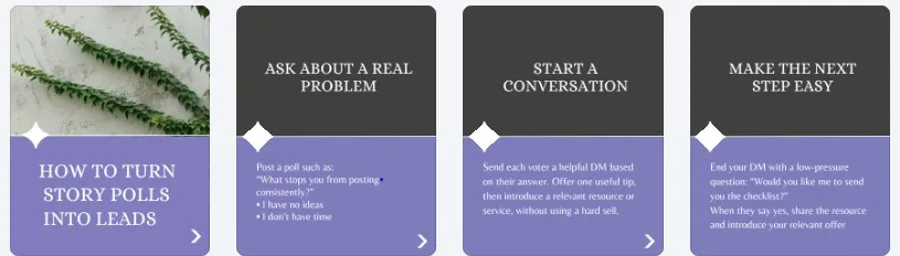
A carousel that keeps one background palette and one heading style across every slide, which is exactly the visual consistency Step 3 asks for.
Color & Contrast
Use high-contrast color pairings — dark text on a light background, or the reverse. Avoid busy photo backgrounds behind body copy, and always preview your color choices on an actual phone screen before publishing.
Typography Hierarchy
- Main headline: bold, 40pt or larger
- Subheading: regular weight, around 24pt
- Body text: light weight, 18pt minimum
White space is your friend here — a slide with room to breathe reads faster than one packed edge to edge.
Slide Sequencing Psychology
- Slide 1: Hook or curiosity — the setup
- Slide 2: Repeat or rephrase Slide 1
- Slides 3-5: Progressive value, each slide building on the last
- Slide 6: A clear CTA — the resolution and the ask
This sequence mirrors classic storytelling structure: setup, development, resolution, call to action.
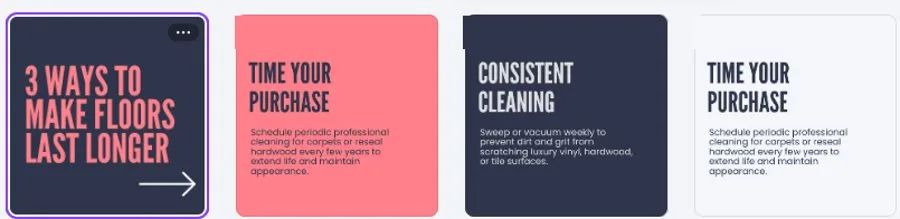
Each slide in this carousel adds one distinct tip rather than repeating the last, which is what keeps a reader swiping through slides 3 to 5.
Pro tip: longer carousels, up to 11 slides, have been gaining traction recently — but only extend past 6 slides if every additional slide earns its place.
Maxolot's AI Instagram post generator handles the design, text, and captions together.
Carousel Ideas by Industry
The same 6-slide structure adapts to almost any small business. A few starting points:
| Industry | Hook (Slide 1) | Value (Slides 3-5) | CTA (Slide 6) |
|---|---|---|---|
| Roofing Contractor | "Storm Damage? 5-Minute Assessment Guide" | Damage types plus a self-check checklist | "Call for a free inspection" |
| Mental Health Practice | "Managing Anxiety: 5 Coping Strategies That Work" | Strategy-by-strategy explanations | "DM for an appointment" |
| E-Commerce Brand | "This Product Changed My Skin (Here's How)" | Before/after photos plus results | "Link in bio to shop" |
| Coaching Business | "The 3 Coaching Mistakes Holding You Back" | Each mistake paired with its fix | "Sign up for a free clarity call" |
| Med Spa | "Botox Myths Debunked" | Myth-and-fact pairs, one per slide | "Book your consultation" |
Best Apps and Tools for Carousel Creation
You don't need all of these — pick based on how much of the design work you want to do yourself.
| Tool | Skill Needed | Templates | Best For |
|---|---|---|---|
| Maxolot | None | Auto-generated per topic | Picking a topic and getting a fully designed, ready-to-post carousel in seconds |
| Canva | None | Ready-made carousel templates | Small business owners who want to design slides themselves without starting from scratch |
| Figma | Design skills required | None built in | The highest flexibility and design quality, for teams with a designer |
| Ocoya | Some design input needed | Preset templates | DIY creators who don't mind finding their own topics, copy, and images |
Maxolot's carousel builder generates done-for-you carousels in seconds: pick a topic relevant to your business from a suggested list, and the app designs a ready-to-post carousel with layout, images, text, and a caption included.
Free trial, no card required — includes templates pre-built for your industry.
Frequently Asked Questions
How long should an Instagram carousel be?
Can I edit a carousel after posting?
What if my carousel dimensions are wrong?
What's the best carousel length for a small business?
Can AI create effective Instagram carousels?
Do I need design skills to create an Instagram carousel?
How much time does making a carousel actually take?
Are carousels better than Reels for engagement?
Final Verdict
Carousels reward the businesses willing to plan a slide sequence instead of posting a single image and moving on. The five steps above take about 30 minutes end to end, and the payoff is real: more time-on-post, more saves, and better algorithm ranking. If you'd rather skip the design work entirely, Maxolot's carousel builder turns a topic pick into a finished, ready-to-post carousel in minutes.
Engagement figures (40% more time spent, 3x saves, 25-40% higher engagement within 30 days) are industry-reported ranges based on widely-observed Instagram carousel performance trends and are illustrative rather than guarantees; actual results vary by industry, audience, and execution.
10 posts free, no credit card. Generate your first carousel in under five minutes.