Quick answer: There's no single Instagram algorithm and no secret formula. Distribution depends on the surface, your relationship with the viewer, and how people respond to the content — mainly watch time, likes per reach and sends per reach. Nothing here guarantees reach; it shifts the odds in your favor.
Key Takeaways
- Instagram runs separate ranking systems for Feed, Stories, Reels and Explore — there is no single universal algorithm to "beat."
- Watch time, likes per reach and sends per reach are the clearest signals Instagram's own leadership has pointed to, though their weight shifts by surface and audience.
- Reels aren't the only discovery format anymore — carousels can reach non-followers too, and often earn deeper engagement along the way.
- Editing content in a third-party app doesn't hurt reach; a visible watermark from another platform can.
- There's no proven way to "reset" low reach by pausing — the fix is better content and a genuine look at what changed in your Insights.
No watermark, no credit card — review every post before it publishes
1. What Is the Instagram Algorithm?
The Instagram algorithm is really a collection of machine-learning systems, each trying to predict which content one specific person is most likely to find useful, interesting or entertaining.
There isn't one universal algorithm running the whole app. Feed, Stories, Reels and Explore each rank content differently, because people use each of those surfaces differently — the way you browse Explore has little to do with how you catch up on Stories.
The goal was never to "hack" the algorithm — it's to make original content that holds attention, earns meaningful actions, and actually matches what your audience is looking for.
Practical tip: follow Adam Mosseri, Head of Instagram, for product updates and direct myth-busting straight from Instagram's own leadership.
2. How Does the Instagram Algorithm Work in 2026?
Every eligible post gets evaluated against a mix of signals: your relationship with the viewer, the topic, that person's prior behavior, content quality, and predicted actions.
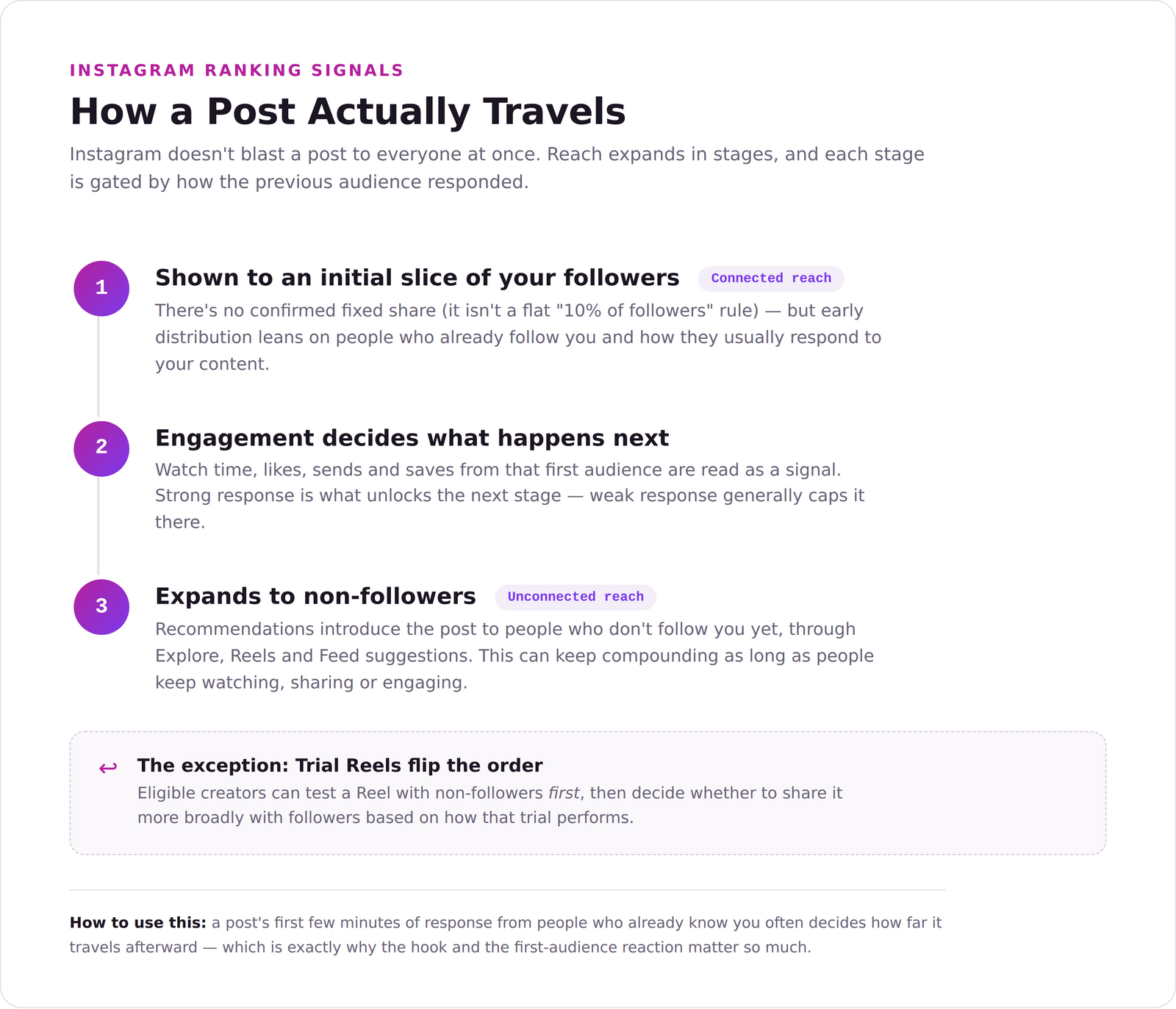
Instagram separates connected reach — distribution to people who already follow you — from unconnected reach, where recommendations introduce your content to people who don't. Those two audiences behave differently, and Instagram treats them differently.
There's no verified rule that every post is first shown to some fixed slice of your followers, like a flat 10%. Distribution is dynamic, and a post can keep gaining reach long after it's published, as long as people keep watching, sharing or engaging with it.
Connected and unconnected reach
Connected reach depends heavily on your existing relationships and how your followers typically respond to what you post.
Unconnected reach, on the other hand, comes through recommendations — in Reels, Explore and Feed suggestions.
Likes tend to carry more weight with people who already follow you, while sends and shares matter more for reaching new people entirely. And original, recommendation-eligible content has a real edge over anything that reads as copied or visibly recycled from somewhere else.
Official guidance: Instagram — Helping Creators Find New Audiences
3. Which Instagram Metrics Matter Most for Reach?
Instagram has repeatedly pointed to three broad signals: watch time, likes per reach, and sends per reach. Exactly how much each one counts shifts depending on the surface and whether the viewer already follows you.
Skip rate is really just the inverse of attention — if people bail on a Reel quickly, average watch time drops. For static posts and carousels, dwell time and swiping behavior are more useful ways to think about it than a three-second video skip.
Example: how one Insights screen ordered six rates
| Importance shown | Metric | Example rate |
|---|---|---|
| 1 | Skip rate | 48.7% |
| 2 | Share rate | 2.4% |
| 3 | Like rate | 1.6% |
| 4 | Save rate | 1.9% |
| 5 | Repost rate | 0.0% |
| 6 | Comment rate | 0.5% |
Data source: Instagram post supplied for this article
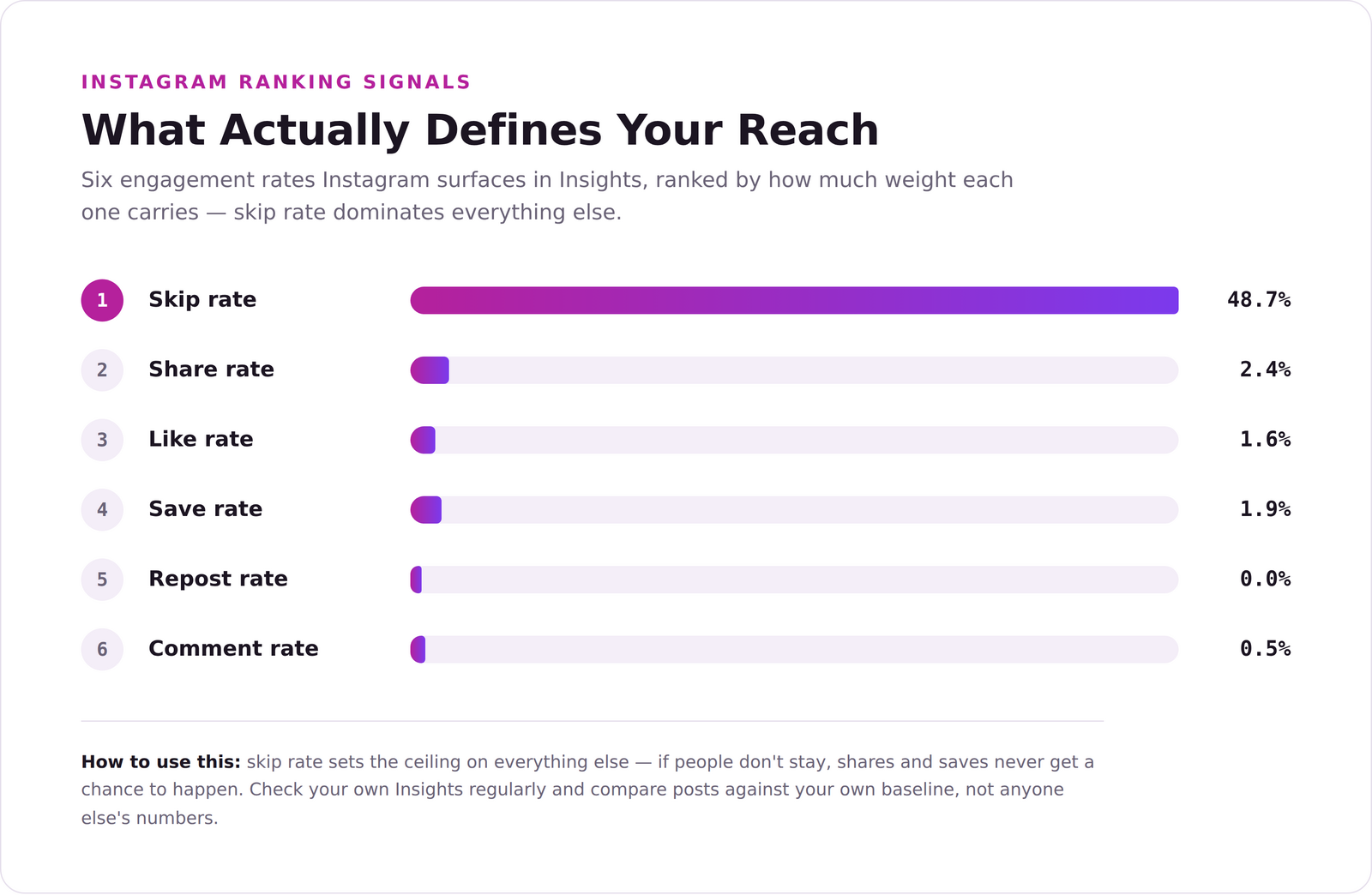
Important: these percentages are one account's snapshot, not a universal Instagram weighting formula. Use your own Insights to compare posts against your own normal baseline — not against someone else's screenshot.
Metric 1: Skip rate and watch time
For Reels, the opening second does most of the work. A clear promise, a visual change, or a pattern interrupt gives people a reason to stick around.
- Lead with the strongest result, problem, or surprise.
- Cut the slow logo, the long greeting, the unnecessary setup.
- Add on-screen text so the idea lands even with the sound off.
- Match the hook to the actual payoff — a misleading hook might win you a second of attention, but it costs you trust.
Need a stronger opener? The Maxolot Instagram Hooks Generator turns one business topic into a focused opening line in seconds, which is a faster starting point than staring at a blank caption box.
Metric 2: Share rate
Shares are a strong discovery signal, since they move your content from one person to another. Direct sends in particular can be especially valuable for unconnected reach.
- Create relatable content people recognize in themselves, or in a friend.
- Use a natural "send this to someone who…" prompt when it genuinely fits.
- Share a clear point of view — not manufactured outrage.
Metric 3: Like rate
Likes still matter, and they're particularly useful for understanding how your existing followers respond. Just don't treat them as the only measure of whether something is working.
Metric 4: Save rate
A save is a signal that someone expects to use this again later. That tends to show up in a few reliable formats:
- Practical tips and checklists
- Step-by-step instructions
- Educational breakdowns
- Templates, examples and reference lists
For repeatable educational formats, it's worth browsing Maxolot's Instagram post templates and adapting the underlying lesson to your own business rather than starting the structure from scratch each time.
Metric 5: Repost rate
Reposts and Story shares extend how far content travels. Emotional and identity-based posts tend to do well here, since people use them to express who they are or what they believe.
- Create content that makes people feel something specific.
- Use a "this is so me" or "this is exactly my client" moment, without tipping into generic territory.
Metric 6: Comment rate
Comments can deepen a conversation, but forced engagement bait isn't a sustainable strategy. Ask questions that are genuinely easy to answer and relevant to the post.
- Ask for a specific opinion, not a vague one.
- Offer two real choices instead of an open-ended prompt.
- Use a thoughtful, mildly polarizing take — only when your brand genuinely holds that position.
If you want more specific prompts to work from, the Maxolot Instagram Story Question Generator is built for exactly this.
The new Instagram growth formula
- Hook: reduce early skips and earn attention.
- Content: deliver enough value or emotion to earn a share.
- Growth: repeat what works, and improve whichever signal is weakest.
Stop creating blindly. Optimize for the actions your audience actually takes, not the ones you assume they should.
4. How to Use Reels, Carousels, Single Posts and Stories
Each format does a different job — the fastest way to pick the right one is to match it to what you actually need that post to accomplish.
| Format | Primary purpose | Best uses |
|---|---|---|
| Reels | Discovery and reaching new followers | Fast demonstrations, opinions, transformations and entertaining ideas |
| Carousels | Discovery plus deeper engagement | Guides, stories, comparisons, case studies and educational breakdowns |
| Single posts | Clear communication | Information, offers, announcements, quotes and entertainment |
| Stories | Relationships and sales | Behind the scenes, proof, FAQs, conversations, launches and direct offers |
Reels and carousels both support discovery
The era of treating Reels as the only growth format is over. Reels are still strong for recommendation-led discovery, but carousels can combine discovery with longer engagement and repeated swipes.
Use the formats you can actually create consistently and well. A strong carousel can outperform a weak Reel, and a clear Reel can reach people who'd never pause for a long carousel in the first place.
Why carousels are a growth workhorse
A carousel creates several separate opportunities to earn a swipe, a save, a share, or a comment — not just one shot at a single image.
- Instagram may re-show a carousel using a different slide when someone didn't swipe the first time. That's a second opportunity, not a guaranteed 200% increase in views.
- Adding music can make eligible photo content available in video-led discovery surfaces like the Reels tab.
- Carousels can hold up to 20 photos or videos — plenty of room to teach something or tell a full story.
How to use individual captions on carousel slides
Instagram's multiple-captions option lets creators add a separate caption to individual carousel slides (availability can vary by account and rollout stage). A few ways to actually use it:
- Put extra explanation right beside the slide that needs it.
- Tell the story behind each image separately, rather than cramming it all into slide one.
- Use different calls to action across the sequence.
- Create parallel storylines that meet at the final slide.
- Hold back a relevant clue, surprise, or reveal for later — to encourage genuine swiping, not empty engagement bait.
The aim isn't to force swipes. It's to make every swipe worth taking.
Carousel guidance: Adam Mosseri on carousel reach and music
5. Do Third-Party Editing Apps Reduce Instagram Reach?
No. Instagram doesn't penalize content just because it was edited somewhere else.
What can hurt distribution is a visible watermark from another platform — that reads as recycled content. Your own brand logo is a different thing entirely and isn't treated the same way.
Practically, that means external tools for Reel editing, captions, post design and carousel creation are all fair game — as long as you export clean files without another platform's watermark stamped on them. Maxolot's first 10 posts are free and export without a watermark, so they can go straight onto Instagram without creating the recycled-content signal Instagram specifically warns about.
Source: Adam Mosseri on third-party editing apps and watermarks
Keep the feed useful, not relentlessly promotional
A feed made entirely of offers gives people little reason to keep coming back. Balance sales content with education, proof, connection and entertainment.
Stories can carry more frequent sales messages, since they're relationship-led and temporary by nature. Feed posts should still include offers — just place them inside a broader system of value, not as the whole strategy.
6. Best Time to Post and How Often to Publish
There's no universal best time that guarantees reach. Timing is a small optimization compared with the quality, relevance and retention of the content itself.
How to find your best posting time
- Open Instagram Insights.
- Check when your followers are actually most active.
- Schedule the post roughly one hour before that activity peak.
- Compare results across several weeks instead of judging off one post.
If a post is already performing well, you don't need to wait for it to stop growing before posting again — posts are ranked independently. That said, avoid publishing feed posts back-to-back within a few hours; posting the next item later the same day (within roughly half a day) is generally reasonable if it matches your normal cadence.
Consistency beats a perfect clock
A realistic schedule you can actually maintain is worth more than a burst of high volume followed by silence. Increase frequency gradually, and watch reach per post, total reach, and your own workload together.
7. How to Use Trial Reels
Trial Reels let eligible creators test a Reel with non-followers first, before deciding whether to share it more broadly with their existing followers.
- Choose a hook, format, or topic you actually want to test.
- Turn on Trial before publishing the Reel.
- Review the initial performance against your other Trial Reels.
- Share a strong trial with followers, or use automatic sharing when it's available.
- Record what changed — hook, length, topic, visual, or call to action — so the test actually teaches you something.
Scheduling Trial Reels can help you batch work and publish more consistently. Scheduling at least 30 minutes in advance may improve operational reliability, but it doesn't give Instagram some special pre-publication ranking advantage.
Official guide: Meta — Test Content With Non-Followers Using Trial Reels
8. Instagram Posting Schedule
Use this as a planning framework, not an official Instagram prescription. The higher-volume columns are demanding — reduce volume when quality, originality, or audience response starts to slip.
| Day | Basic | Moderate | Growth focused | Maximum growth |
|---|---|---|---|---|
| Monday | 1 post | 1 post + 2 Trial Reels | 2 posts + 2 Trial Reels | 2 posts + 1 Reel + 3 Trial Reels |
| Tuesday | 2 Trial Reels | 1 feed post | 1 post + 1 Reel + 2 Trial Reels | 2 posts + 1 Reel + 3 Trial Reels |
| Wednesday | 1 post | 1 Reel + 2 Trial Reels | 2 posts + 2 Trial Reels | 2 posts + 1 Reel + 3 Trial Reels |
| Thursday | 2 Trial Reels | 1 post | 1 post + 2 Trial Reels | 2 posts + 1 Reel + 3 Trial Reels |
| Friday | 1 post | 1 post + 3 Trial Reels | 2 posts + 1 Reel + 2 Trial Reels | 2 posts + 1 Reel + 3 Trial Reels |
| Saturday | Break | 1 Reel | 1 post + 2 Trial Reels | 2 posts + 1 Reel + 3 Trial Reels |
| Sunday | Break | 1 post + 1 Trial Reel | 2 posts + 2 Trial Reels | 2 posts + 1 Reel + 3 Trial Reels |
Quality control: if the schedule starts producing repetitive posts, lower retention, or audience fatigue, move down one level. More posts don't automatically create more reach.
9. How to Batch Instagram Content
Batching separates strategy, writing, design and scheduling, so you're not reinventing the whole process every single day.
A six-step batching workflow
- Choose the business goal: discovery, trust, conversation, or sale.
- Select a balanced mix of content pillars — teach, prove, connect and convert.
- Write several hooks before choosing the strongest one.
- Create Reels and carousels for discovery, single posts for clarity, and Stories for conversation and sales.
- Add captions, keywords, calls to action, and clean exports without third-party watermarks.
- Schedule the batch, then review watch time, sends, likes and format-specific behavior in Insights.
Maxolot keeps its content formats aligned with current Instagram trends and turns a single business description into ready-to-edit posts and carousels. The first 10 posts are free, which makes it a reasonably low-friction way to test a full batch before committing to a larger workflow.
10. Instagram SEO and Google Search Visibility
Public photos and videos from eligible professional Instagram accounts can be processed and displayed by search engines like Google and Microsoft Bing.
That expands Instagram SEO well beyond in-app discovery — a Reel, carousel, or post may show up in web search, though indexing and ranking are never guaranteed.
Who may be eligible for search-engine indexing?
- The account is public.
- The account is a professional creator or business account.
- The account holder is 18 or older.
- The relevant indexing setting is enabled and the content stays public.
How to optimize Instagram content for Google Search
- Use a clear primary topic for each post.
- Place the main keyword naturally in the caption and visible text.
- Write descriptive captions that answer a real search question.
- Optimize the profile name, bio and category for your business topic and location.
- Use descriptive alt text where it's appropriate.
- Keep important posts public, and avoid deleting URLs you actually want search engines to retain.
- Link from a relevant website article to the Instagram post when it adds evidence or a visual example.
Instagram visibility can support SEO, but it should complement — not replace — an owned website. Search engines ultimately control whether a post is indexed, how it's displayed, and how long it stays visible.
Related reading: Instagram's guide to search-engine indexing
11. How to Help Instagram Understand Your Account
You don't need to "educate" Instagram with artificial activity. What actually helps is providing consistent, clear signals about your topic, audience and content quality.
- Publish original content within a recognizable set of topics.
- Use keywords naturally in your profile, captions and on-screen text.
- Engage genuinely with relevant accounts, and respond to real comments and messages.
- Check Account Status and recommendation eligibility when reach changes suddenly.
- Study your own Insights and repeat the patterns that actually improve retention and sharing.
- Don't buy followers or engagement — artificial audiences distort your data and can weaken both short-term performance and long-term decision-making.
Can you reset the Instagram algorithm?
Instagram offers a Reset Suggested Content option that changes the recommendations you personally see across Feed, Reels and Explore.
That feature resets your viewing recommendations. It doesn't reset your account's reach, erase your performance history, or guarantee any kind of distribution boost.
Taking several days off from posting isn't a proven reach reset either. Pause when you genuinely need time to improve the strategy — not because silence is some kind of algorithm hack.
Official explanation: Meta — Reshape Your Instagram With a Recommendations Reset
Instagram Algorithm FAQ
Is there one Instagram algorithm?
What are the most important Instagram ranking signals?
Is skip rate the most important Instagram metric?
Do editing apps reduce Instagram reach?
Are Reels still the best way to grow?
Does Instagram show carousels twice?
What is the best time to post on Instagram?
Will a new post kill the reach of a successful post?
Should every Reel be published as a Trial Reel first?
Can Instagram posts appear on Google?
How many hashtags should I use?
Can I reset low Instagram reach?
Turn one business description into ready-to-edit posts and carousels
Build Content Around What Matters
The strongest Instagram strategy is genuinely simple: earn attention with a clear hook, deliver content worth sharing, and use every format for the job it does best.
Maxolot monitors Instagram content trends and reflects them in the posts it creates, helping small businesses turn strategy into an actual, consistent publishing habit. You can start with 10 free posts and review every single one before it publishes.