
By Natalia de Vlieger, founder of Maxolot · Updated November 2026 · 16 min read
TL;DR: the best social media content creator apps
The best social media content creator app depends on which part of your workflow you want to improve.
| App | Category | Best for |
|---|---|---|
| Notion | Content planning | Organizing ideas and calendars |
| Maxolot | Instagram content automation | Automated Instagram strategy and creation, no prompts |
| Predis.ai | AI content creation | Generating social media creatives and ads |
| Ocoya | AI marketing content | AI-assisted social media workflows |
| Canva | Design | Social graphics and carousels |
| Adobe Express | Design | Branded marketing content |
| Figma | Collaborative design | Reusable design systems |
| Visme | Infographics | Data-driven and educational visuals |
| CapCut | Video editing | Short-form videos |
| Descript | Video and audio editing | Podcasts and talking-head videos |
| ChatGPT | AI writing | Ideas, captions and scripts |
| Claude | AI writing | Long-form writing and brand voice |
| Buffer | Scheduling | Simple social media publishing |
| Later | Scheduling | Visual Instagram planning |
| Metricool | Scheduling and analytics | Publishing and performance monitoring |
| Hootsuite | Social media management | Larger teams and many accounts |
| OpusClip | Content repurposing | Turning long videos into short clips |
| Repurpose.io | Content distribution | Publishing content across platforms |
Quick recommendations:
- Instagram content planning and automation without prompts: Maxolot.
- AI-generated social media posts and ads: Predis.ai.
- Social media graphics: Canva or Adobe Express.
- Short-form video: CapCut.
- Podcasts and talking-head videos: Descript.
- AI captions and ideas: ChatGPT or Claude.
- Scheduling: Buffer, Later or Metricool.
- Turning long videos into short clips: OpusClip.
Our takeaway: most content creator apps specialize in one part of the process. Maxolot takes a different approach for small businesses focused on Instagram: it defines your topics, applies a content-pillar strategy, uses 18 types of hooks, creates posts and carousels, and schedules them to Instagram. No prompts or topic brainstorming needed. 10 free posts, then plans from $19/month.
Key takeaways
- Content creator apps fall into 8 categories: AI content creators, planning, design, video, writing, scheduling, repurposing and analytics.
- Planning, creating and publishing are three different jobs. Most apps only do one.
- Maxolot is the only app here that decides what to post for you: ready-made topics, four content pillars, 18 hook types, posts, carousels and Instagram scheduling. No prompts. 10 free posts, plans from $19/month.
- Predis.ai and Ocoya are strong AI content creators, but you give them the prompts.
- Canva and CapCut are the go-to tools for designing graphics and editing short videos.
- A solo creator often needs 5 tools; a small business on Instagram can do most of it in one.
A note on bias: I’m the founder of Maxolot, so weigh that accordingly. I’ve tried to say clearly where each of the other apps is the better choice.
What Is a Social Media Content Creator App?
A social media content creator app is software that helps people, creators, brands and businesses plan, produce, edit or publish content for Instagram, TikTok, Facebook, LinkedIn, Pinterest and YouTube.
Depending on the app, it can help you:
Some apps do one job, like video editing or design. Others combine several steps. The key distinction: planning, creating and distributing content are three different jobs, and picking the right mix of tools saves time and repetitive work.
The 8 categories of content creator apps
AI content creators
Maxolot, Predis.ai, Ocoya
Planning and ideas
Notion
Design and carousels
Canva, Adobe Express, Figma, Visme
Video editing
CapCut, Descript
AI writing and hooks
ChatGPT, Claude
Scheduling
Buffer, Later, Metricool, Hootsuite
Repurposing
OpusClip, Repurpose.io
Analytics
Metricool, Hootsuite
AI Social Media Content Creator Apps: Maxolot, Predis.ai and Ocoya
AI social media content creator apps cut the manual work of producing posts. Depending on the app, they generate topics, captions, images, carousels and other creatives. Here are the three we recommend, starting with the only one that also decides what you should post.
Maxolot: Best for Automated Instagram Content Strategy and Creation
Maxolot is an AI Instagram content creator for small businesses that want to keep their account active without planning every post themselves. Its main difference: you don’t write prompts or come up with post topics. Maxolot starts with your business.
What you tell it
- A clear description of what your company does.
- Your products and services.
- Your reasons to believe: evidence, experience or what makes customers trust you.
- Any other details, messages or strengths worth highlighting.
Maxolot uses this to decide which topics your business should publish, using a built-in strategy with four content pillars:
Educational
Tips, advice and useful information that show your expertise.
Entertainment
Engaging ideas that make your brand more relatable.
Products and services
Posts that show what your business sells and offers.
Business
Your story, values, experience and what makes you different.
That gives you a balanced mix instead of the same promotional post again and again.
Types of hooks, built in
Maxolot’s own system has 18 types of hooks: different ways to open a post and stop the scroll.
How it works
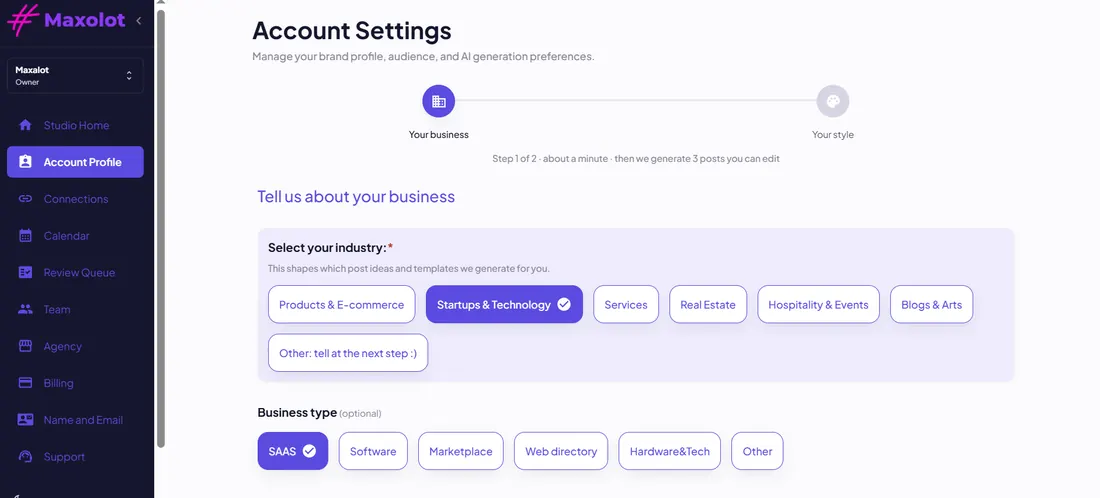 1
Describe your business
What you do, your products and services, your reasons to believe and anything worth highlighting.
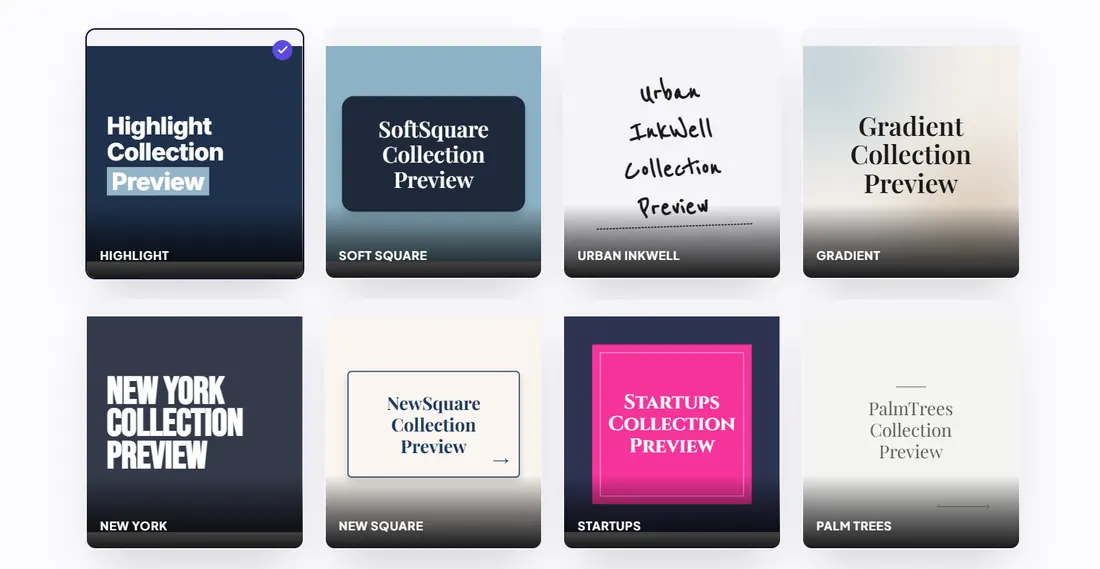 2
Pick your brand style
Choose a design theme, your brand colors and fonts once.
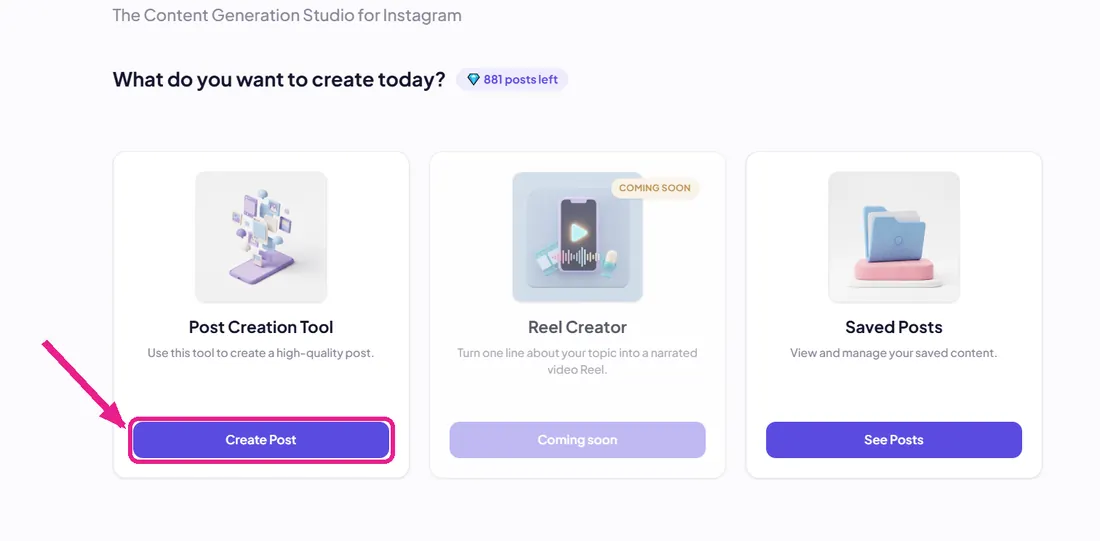 3
Get posts and carousels
Maxolot picks the topic from your four content pillars, writes the hook and caption, and designs the post.
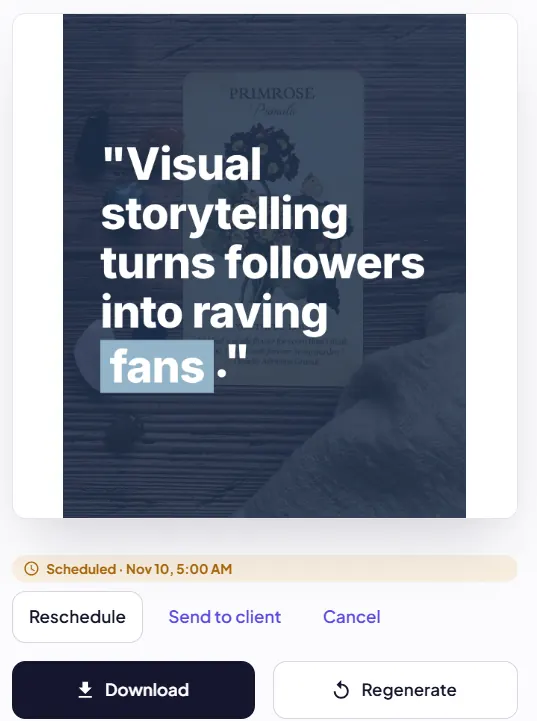 4
Schedule to Instagram
Review, edit if you like, then post or schedule straight to Instagram.
Key features
- No prompts needed
- Ready-made topics chosen for you
- Strategy built on four content pillars
- Its own system of 18 hook types
- Content made for your business
- Single-image posts and carousels
- AI captions and hashtags
- Your brand colors and fonts
- Scheduling and posting to Instagram
Limitation
- Doesn’t create Instagram Reels yet. If you need Reels, add a video editor like CapCut.
Best for: small businesses that want to automate Instagram planning, creation and scheduling instead of managing every step by hand.
Predis.ai
Best for AI social posts and ads for online stores
Predis.ai helps businesses generate social media content and ads with AI, from a product link, a text prompt or an image. It suits stores that want to speed up creative production. No free plan, a 3-day trial; Core from $32/month.
Ocoya
Best for AI-assisted marketing workflows
Ocoya combines AI content creation with social media marketing and management, so you can write, design and schedule across platforms. A 7-day trial; Starter from $29/month.
Want to compare more AI post generators? See our 11 best AI Instagram post generators.
Content Planning and Idea Generation Apps
Before you create anything, you need to know what to publish. Planning apps help you organize ideas, build calendars, collect research and coordinate production.
Notion
Best for organizing content ideas
A flexible workspace for ideas, drafts, editorial calendars and content projects. It works for anything from a simple list of Instagram topics to a full production system. Great for solo creators and small teams.
What to consider: planning apps organize the topics you give them. They don’t decide which topics your business should publish or build a strategy around your products and services. That’s what Maxolot does for Instagram.
Graphic Design and Carousel Creator Apps
Design apps turn ideas into visuals: Instagram posts, carousels, Stories, infographics and promo graphics.
Canva
Best for accessible social media design
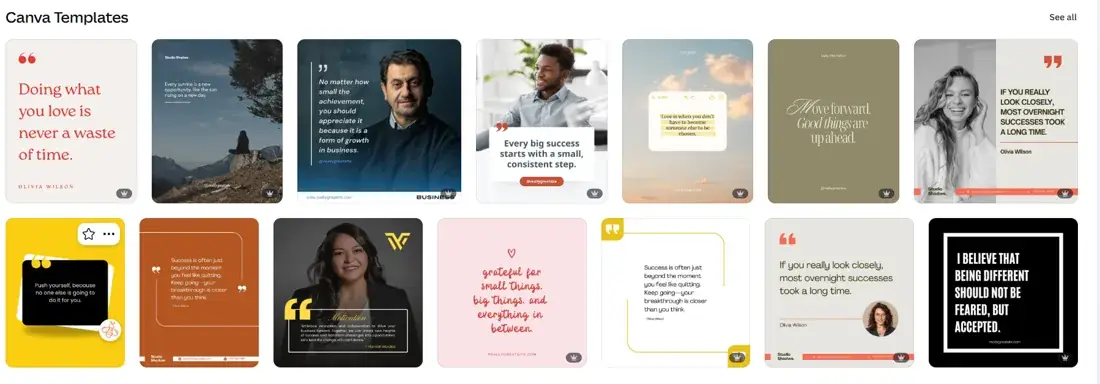
Templates and a drag-and-drop editor let you make social graphics, branded posts and carousels without design skills. Best for small businesses that want control over the look.
Adobe Express
Best for branded marketing graphics
Templates and creative tools for polished social graphics and marketing assets, with a consistent look. Best for businesses producing many kinds of branded materials.
Figma
Best for collaborative design systems
Build reusable social templates, components and design systems, especially when marketing and product teams work together.
Visme
Best for infographics and visual explanations
Presentations, infographics and visual content for educational brands, consultants and businesses that explain things with charts.
Design tools compared: Canva and Adobe Express are easiest for ready-made templates. Figma suits collaborative design systems, and Visme suits information-heavy visuals.
Video Editing Apps
Short-form videos, tutorials, interviews, product demos and podcasts usually need a dedicated editor.
CapCut
Best for short-form video editing
A popular editor for TikTok, Instagram Reels and YouTube Shorts, with templates, effects and captions.
Descript
Best for talking-head videos and podcasts
Edit spoken content by editing the transcript. Useful for interviews, podcasts, tutorials and talking-head videos.
Important: video editors solve production. They don’t decide what your business should post or how it fits a content strategy.
AI Writing, Caption and Hook Generator Apps
Writing tools help with captions, scripts, post ideas and marketing messages, when you know what to say but need help saying it well.
ChatGPT
Best for ideas and captions
Brainstorm topics, write captions, plan calendars, write scripts and adapt messages for different audiences. You give it instructions and context, then move the output into your design and publishing tools.
Claude
Best for long-form writing and brand voice
Helps with longer content, editing and matching a particular tone, which is useful for detailed content and a consistent voice.
Why hooks matter: the opening line decides whether people keep reading. Some writing tools write hooks when you ask; Maxolot builds 18 hook types into every post.
Social Media Scheduling and Publishing Apps
Creating content is half the job. Scheduling tools manage your calendar, handle several accounts and save you from posting by hand.
Buffer
Best for simple social media scheduling
Organize and schedule content across supported networks with a straightforward workflow. Free plan for up to 3 channels.
Later
Best for visual Instagram planning
Plan your publishing calendar visually and manage content across platforms. Good for Instagram-led brands.
Metricool
Best for scheduling and performance
Social media management with analytics and reporting, for businesses and agencies that want publishing and insights together.
Hootsuite
Best for broader social media management
Manage many accounts and publishing activity across a team.
Scheduling tools compared: Buffer for simple publishing, Later for visual planning, Metricool for scheduling plus analytics, Hootsuite for bigger teams. Maxolot also schedules to Instagram, so small businesses focused on Instagram may not need a separate scheduler.
Content Repurposing Apps
Repurposing tools turn existing content into new formats: a long video into short clips, a webinar into educational posts, a podcast into social snippets.
OpusClip
Best for turning long videos into short clips
Creates short clips from longer recordings like podcasts, interviews and educational videos.
Repurpose.io
Best for cross-platform content workflows
Automates parts of distributing and repurposing content across supported platforms.
Why it matters: creating something new every day is hard. Reusing good material in new formats gets more value from what you already have.
Social Media Analytics and Optimization Apps
Posting consistently matters, but you also need to know what works. Analytics tools track performance and show patterns in engagement. Look for:
Metricool and Hootsuite combine social media management with performance features. They’re best for businesses that already post regularly and want to make better decisions with data.
Comparison: Which Social Media Content Creator App Should You Choose?
| Your main need | Recommended app | Why |
|---|---|---|
| Automated Instagram content strategy | Maxolot | Topics, content pillars, hooks and scheduling |
| AI-generated social media content and ads | Predis.ai | AI-assisted post creation |
| AI-assisted marketing content | Ocoya | Marketing content workflow |
| Organizing content ideas | Notion | Flexible planning workspace |
| Creating social media graphics | Canva | Templates and easy design |
| Producing branded visuals | Adobe Express | Creative templates and branding |
| Building design systems | Figma | Collaborative design |
| Infographics and visual explanations | Visme | Data-driven visuals |
| Editing short videos | CapCut | Short-form video production |
| Editing podcasts and talking-head videos | Descript | Transcript-based editing |
| Writing captions and ideas | ChatGPT | Flexible AI writing |
| Developing long-form copy | Claude | Writing and refinement |
| Simple social media scheduling | Buffer | Publishing workflow |
| Visual Instagram planning | Later | Visual content calendar |
| Scheduling and analytics | Metricool | Publishing and performance |
| Managing many accounts as a team | Hootsuite | Broader social media management |
| Repurposing long videos | OpusClip | Short-form video clips |
| Distributing content across platforms | Repurpose.io | Cross-platform workflows |
What Does a Working Social Media Content Creator Stack Look Like?
There’s no perfect workflow for everyone. It depends on your formats, how many platforms you manage and how much time you have. Here are three common setups.
The solo creator
- Notion for ideas and planning
- CapCut for video
- Canva for graphics and carousels
- ChatGPT or Claude for captions and scripts
- Buffer or Later for scheduling
Flexible, but you move between five tools and manage every handoff.
The small business on Instagram
- Give Maxolot your business info, offers and reasons to believe
- Maxolot sets topics with its four content pillars
- It writes hooks with its 18 hook types and creates the content
- Get posts and carousels in your brand style
- Schedule straight to Instagram
- Review and reply to customers
No separate brainstorming, prompt writing, planning or publishing tools. Add CapCut if you also want Reels.
The marketing team
- Notion for planning
- Canva or Figma for design
- CapCut or Descript for video
- ChatGPT or Claude for writing
- Buffer, Later, Metricool or Hootsuite for publishing
- Analytics tools for reporting
Most creative control, but you need processes to keep people, tools and schedules aligned.
What All-in-One Content Creator Apps Actually Offer
“All-in-one” can mean very different things. Some apps combine design, writing and scheduling. Some turn one format into another. Some have many features but still need you to bring the strategy, topics and creative direction. There are three levels of automation:
Content creation automation
The tool generates the content itself: text, images, captions, graphics or video.
Workflow automation
The tool connects steps, like creation, calendar and scheduling.
Content strategy automation
The tool decides what you should publish, which topics to cover and how to balance different types of content.
Level 3 matters most for small businesses. A design app can make a post look better, but it won’t tell you what to post tomorrow. Maxolot covers all three levels for Instagram: it sets topics across educational, entertainment, product and business pillars, then writes hooks, creates posts and carousels, and schedules them.
All-in-one isn’t always the right choice. A professional video creator still needs a specialist editor, and a design team may prefer Figma. But a small business that mainly needs consistent Instagram content can save a lot of time with one tool that plans and publishes.
What to Look for When Choosing a Social Media Content Creator App
1. Does it decide what to publish?
Some tools only create content once you supply an idea. If ideas are your biggest problem, prioritize topic planning over design features.
2. Does it support your formats?
Images, carousels, Stories, short or long video, text posts. Don’t pay for video if you mainly post graphics.
3. Does it understand your business?
Generic content isn’t enough. Look for tools that use your products, services, audience and differentiators.
4. Does it help with hooks and captions?
A strong visual is only part of a post. The opening line and caption matter too.
5. Can it keep your brand identity?
Check that you can apply your colors, fonts and logo consistently.
6. Does it schedule and publish?
If consistency is your priority, scheduling saves time and simplifies your workflow.
7. Can you measure results?
Analytics show which topics and formats perform best.
Can You Run Social Media on Autopilot?
You can automate much of content production and publishing, but no tool should replace reviewing posts, replying to customers or understanding your audience.
For small businesses, the biggest obstacle often isn’t designing a post. It’s deciding what to publish, consistently. You may have plenty to say about your products and services but struggle to turn it into a varied stream of useful content.
Maxolot solves this by setting topics around four content pillars, using your business description, offers and reasons to believe, with no prompts. Its 18 hook types, post and carousel creation, brand settings and Instagram scheduling connect planning with publishing.
You still review the content and talk to your audience, but you never start from a blank page.
Frequently Asked Questions
What is the best social media content creator app in 2026?
It depends on the job. Canva is great for design, CapCut for short-form video, ChatGPT for writing and Buffer or Later for scheduling. Maxolot is built for small businesses that want Instagram topics planned, posts created and scheduling done in one place.
What is the best Instagram content creator app for small businesses?
Canva is good for design-focused work. Maxolot is built for businesses that want help deciding what to post, a balanced content mix and Instagram scheduling, with 10 free posts and plans from $19/month.
What is the difference between a content creator app and a social media management app?
A content creator app produces assets like graphics, videos, captions and carousels. A social media management app organizes accounts, schedules and publishes posts, and tracks performance. Some apps do both.
Do I need multiple social media content creator apps?
Not always. Creators with specialist needs often combine a video editor, a design app and a scheduler. A small business focused on Instagram may prefer one tool that handles more of the process.
What are the best free social media content creator apps?
Canva and Adobe Express have free design plans, CapCut has free video editing, ChatGPT can help with writing and Buffer schedules up to 3 channels free. Maxolot gives you 10 free posts. Free limits change, so check each app’s current plan.
Which app is best for creating Instagram carousels?
Canva is a flexible option if you want to design carousels yourself. Maxolot creates AI-generated Instagram carousels as part of its business-focused workflow.
Which social media app helps generate content ideas?
ChatGPT can brainstorm ideas when you give it instructions, and Notion helps organize them. Maxolot goes further and sets Instagram topics for your business through its content-pillar strategy.
What is the best app for social media captions and hooks?
ChatGPT and Claude write captions and hooks when prompted. Maxolot builds 18 hook types into its Instagram content creation, with captions and hashtags included.
Can social media content creator apps schedule posts?
Yes. Buffer, Later and Metricool plan and publish content, and Maxolot schedules and publishes directly to Instagram.
Can AI content creator apps generate Instagram Reels?
Some tools support short-form video editing or AI video. Maxolot focuses on single-image posts and carousels and doesn’t create Reels yet.
What are content pillars in social media marketing?
Recurring themes that organize what a brand posts, such as educational, entertainment, product and business content. They keep your feed balanced instead of only promotional.
What is the difference between AI content generation and automated content strategy?
AI content generation creates captions, graphics and copy from your instructions. Automated content strategy goes further and decides which topics to publish and how to organize them around your business and content themes.
Final Verdict: Choose the App That Solves Your Biggest Bottleneck
The best social media content creator app is the one that removes your biggest content problem.
- Video is the bottleneck: CapCut or Descript.
- Graphics: Canva or Adobe Express.
- Writing: ChatGPT or Claude.
- Publishing: Buffer, Later or Metricool.
But if your biggest challenge is deciding what to post and creating Instagram content for your business consistently, Maxolot offers a different approach. Instead of waiting for your prompts, it uses your business information to set a content strategy, creates a balanced mix of educational, entertainment, product and business posts, applies its 18 hook types, makes posts and carousels, and schedules them to Instagram.
For small businesses that want to spend less time planning content and more time running the business, that makes a real difference. Start with 10 free posts, then plans from $19/month.